When a wallet shows a USDT balance but refuses to send it with “insufficient energy”, “not enough bandwidth” or insufficient funds for gas, the shortfall is in whatever that blockchain charges its network fee in: energy, bandwidth and TRX on TRON, ETH on Ethereum, BNB on BNB Smart Chain.
USDT is a token on each of these chains, and moving it means calling a smart contract. That call can’t be paid for in USDT. That leaves two fixes: put the right fee asset (or resource) on the same address that holds the USDT, or send in a way that doesn’t require you to pay the network fee yourself. Pressing retry on its own changes neither.
TRX is burned to cover a shortfall
No TRX and no delegated energy means stuck
Charged as gas
USDT balance doesn’t help
Charged as gas
Needs BNB first
Which word does the error use?
Wallets word these errors differently, but almost all of them name the resource that ran out. That tells you the chain:
- “Energy”, “bandwidth” or a request for TRX: you’re on TRON, sending TRC20 USDT.
- “Gas” with ETH, or something like
insufficient funds for gas * price + value: Ethereum mainnet, ERC20. - “Gas” with BNB: BNB Smart Chain, BEP20.
One wallet can hold USDT on several chains, all labelled “USDT”. The send screen usually shows the network near the asset name. Check it before reading on, because the fix differs completely.
TRON: bandwidth and energy are separate meters
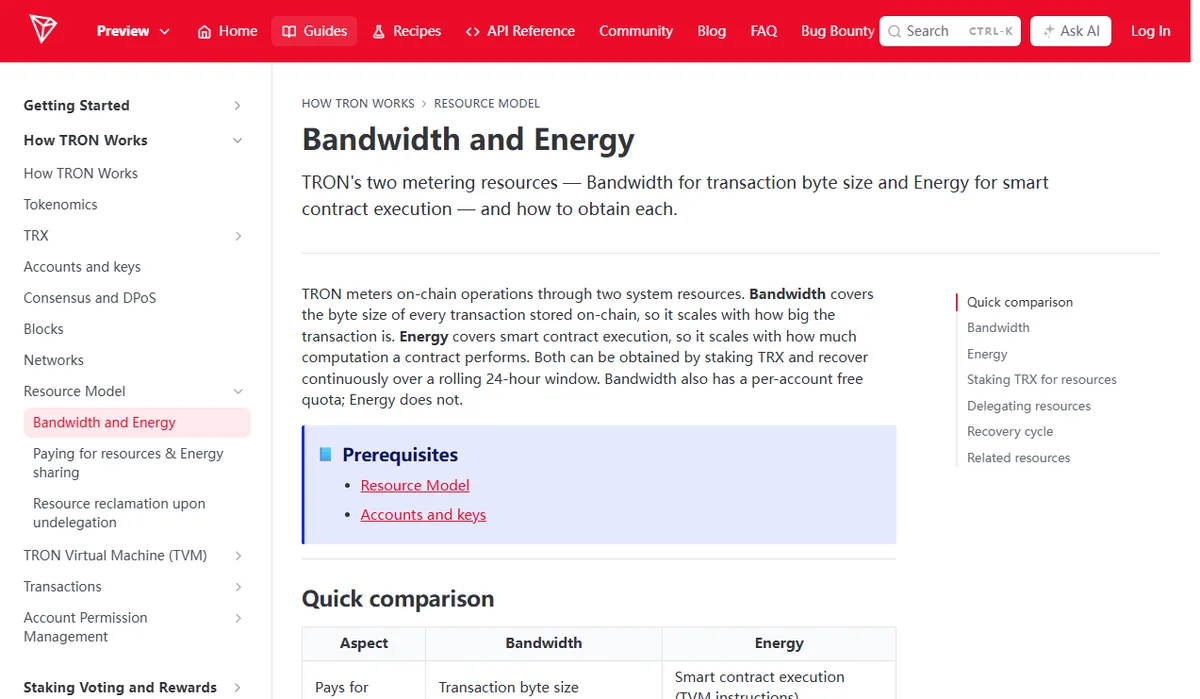
The TRON developer documentation describes two resources. Bandwidth pays for the byte size of a transaction; energy pays for smart contract execution.
The difference that matters here is the free allowance. When we checked the docs in September 2026, every account could use up to 600 free bandwidth points over a rolling 24-hour window. Energy has no free allowance at all: you get it by staking TRX or by having another account delegate it to you, and otherwise the network burns TRX to cover it. A TRC20 USDT transfer is a contract call, so it needs energy.
That produces the classic dead end. An address holds USDT, has nothing staked and has no TRX. Free bandwidth might cover the bytes, but there’s no energy and nothing to burn, so the transfer can’t go through.
You may also see fee_limit. It caps how much a contract call may spend on energy, in sun (1 TRX = 1,000,000 sun). Most wallets set it for you. If it was lowered by hand or the estimate came in short, the call can run out partway and fail — and a failed call isn’t automatically free. The block explorer shows what it actually consumed; more on that below.
How much TRX is enough?
There’s no fixed number worth quoting. The energy a USDT transfer uses can depend on the state of the contract and the receiving address, and how much TRX a unit of energy costs is a network parameter that gets adjusted. A “costs about X TRX” figure in a guide describes the day it was written.
A safer routine: send a small amount of TRX to the address, go back to the send screen, and read the estimate the wallet gives for energy, bandwidth and TRX to be burned. Send once the balance covers it with some room to spare.
Three ways to get energy
Keep some TRX on the address and let the network burn it. No extra steps. It suits someone who sends USDT now and then. Every transfer burns real TRX.
Stake TRX for energy. Most TRON wallets have a “Resources” or “Stake” section. Staked energy regenerates over 24 hours. In September 2026 the docs gave a 14-day waiting period after unstaking before the TRX can be withdrawn; it is a network parameter, so recheck it before you stake. Staking suits people who send USDT often and planned to hold TRX anyway. Staking just to send one transfer locks the money for that whole waiting period.
Have energy delegated to you. The protocol lets one account delegate staked energy to another address, which then uses it without staking. “Energy rental” services are third parties built on that feature; TRON itself doesn’t run them.
A legitimate rental only needs your receiving address and a TRX payment. Anything asking for your recovery phrase, your private key, or a signature on an unfamiliar site is a reason to stop — delegated energy arrives at your address without anyone touching your keys. For a single transfer, topping up with TRX has one less party to vet.
Ethereum and BNB Smart Chain: you need ETH or BNB
These two are simpler. No free allowance, no resource layer; the fee is paid in the native coin. The Ethereum documentation states that gas must be paid in ETH, and the BNB Chain documentation describes BNB as the gas for contract execution. USDT alone on the address, zero ETH or BNB, means no transfer.
Confirmation screens often show an estimated fee and a maximum fee. Per the Ethereum docs, the sender is refunded the difference between the max fee and the base fee plus tip actually charged. Your balance needs to cover the maximum; the final charge is usually lower.
The same page explains what happens when a transaction runs out of gas mid-execution: changes are reverted, but all the gas the transaction provided is still consumed. USDT stays put, yet some ETH is gone.
“Speed up” won’t fix a zero balance
Speeding up replaces a pending transaction with a higher bid. With no ETH or BNB on the address, a higher bid is still unpayable. Top up first, then send.
Getting the fee coin there without a new mistake
Usually you’ll withdraw a little from an exchange. Pick the matching network: TRX on TRON; ETH on Ethereum (ERC20) mainnet rather than a layer-2; BNB on BNB Smart Chain (BEP20). The wrong network delivers the coin to the same address on a different chain, and your USDT side still has nothing to pay with. The differences are covered in TRC20, ERC20 or BEP20.
Exchange withdrawals have minimums and fees, and for a tiny amount of TRX or ETH the withdrawal fee can be a large share. Look at both before you commit; comparing fees on small transfers shows how.
Sometimes you can skip the wallet step entirely. Suppose the USDT is still on an exchange and the plan was to withdraw to your own wallet, then forward it. If the recipient accepts deposits on the same network, withdraw straight to them: the platform’s withdrawal fee covers the network cost, and your wallet never needs TRX or ETH. The difference between the two charges is explained in trading fees, withdrawal fees and gas.
If one attempt already failed, look it up on-chain
Find the failed transaction’s hash in your wallet history and open it in that chain’s explorer — Tronscan, Etherscan or BscScan. Three things to read:
- Status: failed, reverted, or never broadcast. Something that never reached the chain normally cost nothing.
- What it consumed: energy, bandwidth and burned TRX on TRON; the transaction fee on Ethereum or BNB Smart Chain.
- Token movement: a failed transaction has no USDT transfer, so the balance should still be on the original address.
If the explorer shows success but the USDT isn’t where you expected it, you have a different problem — start from USDT not received.
Fix the cause before trying again. Resending an identical transaction usually just pays the fee a second time.
Keep a little fee coin on that address
If you’ll send USDT from the same wallet again, leave a small amount of TRX, ETH or BNB on that address, using your usual chain’s estimate as a guide and keeping extra on top. Run the network and address through the transfer checklist before each send.
It’s worth telling the person you pay, too. If they later move that USDT out of their own wallet, they’ll need the same fee coin.