Start by checking whether the relevant Binance service is available to you, using your real residence and identity. Being able to load a registration page does not establish eligibility. If you already have an account, use sign-in or recovery instead of creating another account for a referral benefit.
For an email or phone registration, the usual route is contact verification, password creation, referral confirmation and the identity checks required by your account. If you are already at the referral step, go to where to check BN8689.
What to prepare before you start
Use an email address or phone number you expect to keep. Check that you can receive messages and recover access to it. Temporary numbers, borrowed inboxes and an email account protected only by the phone you are about to replace make future recovery harder.
Have your own valid identity documents ready, but read the account's requirements before taking photographs. Accepted documents and additional information depend on residence and account circumstances. Work on a trusted device with access to the camera if needed. Nobody helping you understand a page needs your password, verification code or a copy of your identity document in a private chat.
Are you opening an account or recovering one?
Check your saved sign-in information if you cannot remember which method you used before. You may have used a third-party button originally and now be starting again through an email form. Or your email may still work while the authenticator is missing. Identify the access method you lost before choosing recovery; a missing SMS does not mean you have no account.
If the page says the email or phone is already in use, keep the message and return to the official sign-in page. Do not immediately try another email and submit your documents again. A referral code cannot bypass the original account's identity or security checks.
| Your situation | First action |
|---|---|
| Never registered; you control a lasting email or phone | Continue with the personal-account steps and check residence and document requirements |
| You remember an account but forgot its password | Use password recovery from the verified sign-in page |
| The password works but a security code does not | Check recovery for the particular missing device or channel |
| You are unsure whether a third-party login belongs to an old account | Check the original sign-in method; do not confuse creating an account with linking an existing one |
Create the account through a verified official entry
Check the full hostname in the address bar, not just the logo or search result title. Binance's personal registration instructions describe email, phone and supported third-party routes. Choose the account type carefully: that guide says it cannot be changed after registration.
- Enter your own email or phone number and read the applicable terms.
- Request a verification code and enter the valid code for that request. Follow the current password requirements and use a unique password.
- Continue to the referral confirmation and read its result. Account creation is not proof that a referral was linked or that identity verification has passed.
Apple, Google and Telegram routes can use different confirmation screens. Protect the external account too, including its recovery options. Use the requirements and expiry information shown on your current page; an older guide cannot override them.
Signing up on the web and in the app differ in the middle
Both routes open an account. What you see along the way is not the same.
The web flow usually asks for an email or phone first and puts referral confirmation in a step after the account exists. The app may bring region choice, verification method and notification or camera permissions further forward. We would rather run this part on a computer: the address bar stays visible, and an unfamiliar prompt is easier to copy down word for word. The trade-off is switching back to a phone for the document and face steps, which means signing in again in the middle.
If you opened a referral link in a mobile browser and were then moved into the app, check inside the account whether the referral information travelled with you. Opening a link is not the same as an association taking effect.
Either way, use one email or phone number. Submitting on both to see which clears first tends to leave two independent records, and sorting out which one you meant to keep costs more time than it saved.
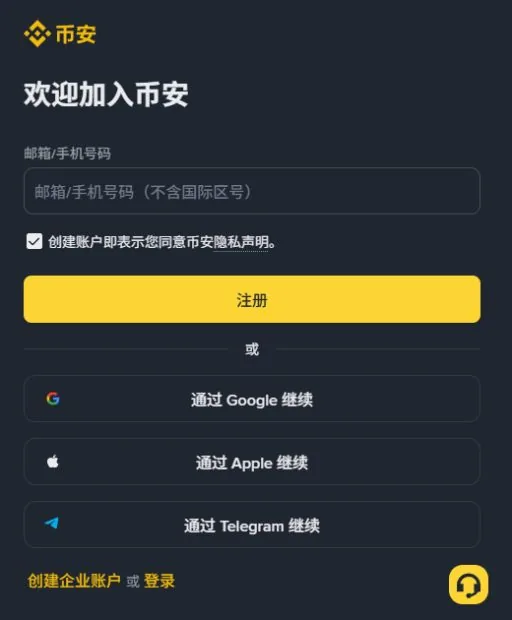
accounts.binance.com/zh-CN/register). The first input is for email or phone. This is the initial form, not a completed registration or referral confirmation. Your language and regional screens may differ. Click to enlarge.If the verification code does not arrive
For email, confirm the spelling and the inbox you opened, then check spam, filtering rules and storage. Use the official missing-email guidance if you need sender information; do not whitelist an address copied from an unexpected message.
For SMS, check the country code, number, signal and blocked messages. Coverage and available alternatives vary; the SMS troubleshooting page explains the distinction. Choose voice or another method only if your current flow offers it.
Respect request limits and countdowns. After several requests, do not cycle through old codes or confuse a sign-in code with a registration code. If the error persists, record its wording without including the code and use official support.
The code arrived, but the page rejects it
Read which kind of code the field requests.
Email, SMS and authenticator codes can all look like short numbers while serving different purposes. Match the message's operation to the request you just initiated. Do not forward the entire message for someone else to locate the number, or try every code in your inbox.
With several tabs open, it is easy to enter a later code into an earlier flow. Keep the current flow, compare the message time with the page instructions and restart that step only through the offered controls if the request expired. Stop requesting codes when a limit appears. One clear error report is more useful than another inbox full of codes.
Where to enter or confirm referral code BN8689
Our referral code is BN8689. In the web guide's confirmation step, a referral link should prefill the code and show a linked state. An invalid, unlinked code can be corrected where the page permits; the guide says a linked code cannot be changed. If the initial email form has no referral box, do not place the code in an unrelated input.
Binance referral code
BN8689Check that the referral relationship shows BN8689, then read the benefits available to your account, the eligible trades and the settlement terms. We cannot verify a personal cashback rate for you from a public registration page.
Visit Binance registration ↗Referral link: WAYMINT may earn a commission from qualifying referrals. Binance determines eligibility and benefits.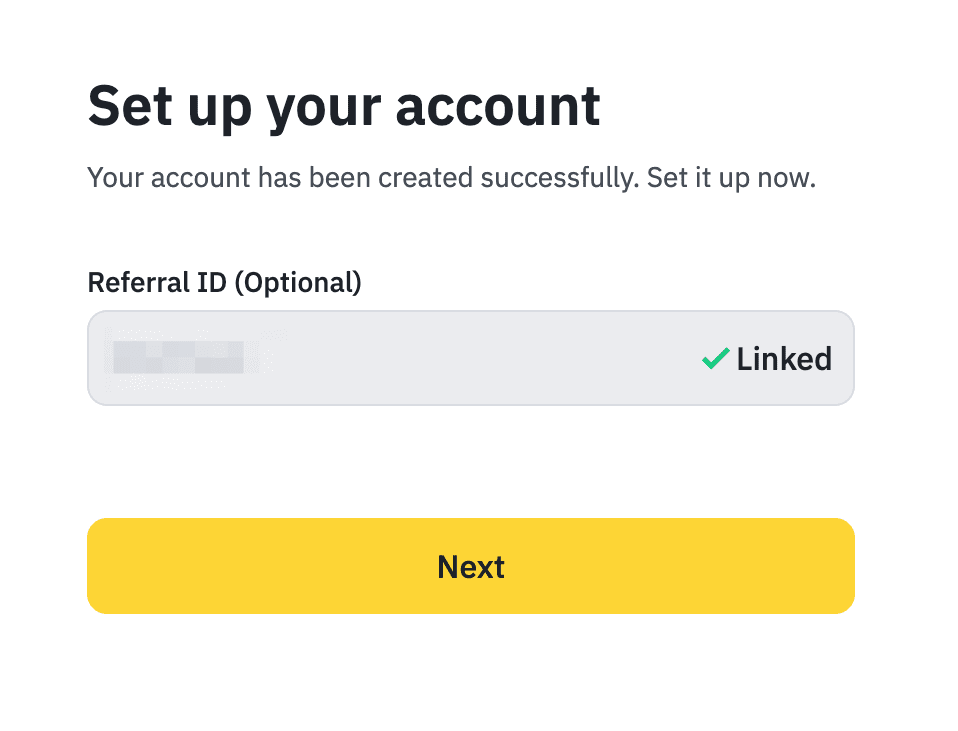
A cashback offer does not necessarily reduce the fee at the moment an order executes. It is not a promise of free withdrawals or wallet gas. If you see another code or an unclear association, stop before confirming and consult the current guidance. We cannot rebind an existing account or guarantee retroactive benefits.
Keep any useful association record privately. Screenshots can expose email addresses, user IDs or other account details. Checking a benefit does not require sending funds to a “rebate manager.” If the service is unavailable where you live, a referral link does not change that.
Complete verification with your own information
Open the identity status inside your account and read its outstanding requirements. Start from the personal identity-verification guidance, then follow your actual account prompts. A friend's accepted document or available product does not establish your eligibility.
Enter your real name, date of birth and residence as requested. Use document information rather than a nickname. If your name has multiple parts or unfamiliar characters, check the instructions instead of inventing a spelling that seems easier for a form to accept.
For photographs, check expiry, legibility, required edges and glare. Improve lighting or retake the photo; do not change document content, replace the portrait or assemble a composite image. Complete face checks yourself. If the camera is blank, inspect permissions before repeatedly submitting. Upload additional documents only through a verified account or protected support process.
Separate rejection reasons. An unreadable photo, a mismatch, an expired document and an unsupported residence require different responses. Keep the exact error and describe the step, what you tried and the current status. Repeated applications with different information are not a substitute for resolving the cause. We do not promise a verification time.
Check document expiry before taking photographs. If the error concerns mismatched information, sharper images alone will not fix it: compare the name and document fields with the document itself. Use a desktop-to-phone handoff only when your official flow provides it, and do not ask a third party to upload documents because manual upload is unavailable.
Submitted, verified and eligible are different states
Uploading a document completes a submission step. A linked referral confirms an association. Neither completes identity verification for you. Reaching an account overview also does not establish access to deposits or trading. Check status and outstanding actions on the account's identity page.
| What you see | What it establishes | Where to look next |
|---|---|---|
| Code accepted | That verification step completed | Remaining password, referral or identity steps |
| Referral linked | The displayed association | Applicable benefits and identity status |
| Identity application under review | The application is awaiting processing | Requests for documents or processing notices |
| A feature is unavailable | You cannot continue that operation now | That feature's eligibility, residence and account notice |
If the problem concerns a particular payment channel, describe that channel's exact message rather than calling it a failed registration. If you think verification passed but still see an old page, reopen the account status page. Do not proceed solely through an approval button in an email; return to the official site or app yourself.
Protect access before depositing
Check which security methods are actually enabled, not merely listed. Set up supported two-factor authentication, passkeys or other protections and understand recovery. Availability can differ by device and account. A new phone displaying an authenticator icon does not prove it has the right keys.
After migration, confirm a valid code on a trusted official account page using a check that does not move funds. Do not delete synced entries from the old phone as a test: with Google Authenticator, deletion can propagate to other devices. See moving an authenticator to a new phone.
Keep recovery material accessible if your daily phone is lost, while controlling who else can read it. Review active sessions and unfamiliar devices. If you suspect someone already has access, address that risk before depositing; do not preserve an attacker's session just to keep a recovery route open.
An anti-phishing code helps assess messages, and an address whitelist restricts destinations. Neither proves that a recipient is trustworthy or that every message link is safe.
Know what you intend to do with the account
You do not need to deposit or trade to prove registration worked. Decide whether you are learning the interface, receiving an asset or planning a specific purchase. An unnecessary trade can cost more than its referral benefit.
A freshly opened account also displays entries for margin, futures and earn products. Their buttons are as easy to press as spot, and their risk is not comparable: margin and futures can lose more than the amount you put into a position, and earn products each carry their own lock-up and redemption rules. A registration guide cannot cover them, and we do not rate whether any of them is worth using. Read that product’s own terms and risk notice before enabling it, rather than assuming that sitting next to spot makes it the same kind of thing.
Account areas such as funding and spot describe different uses of balances. An internal transfer between them is not automatically a blockchain withdrawal. Before receiving crypto, reopen the deposit page and check the asset, full network name, address, memo, minimum and service status. Follow the first USDT transfer guide when you are ready.
Common questions at this stage
Can an existing account add this referral code?
Do not assume retroactive linking is available. Check the account's current eligibility and official rules; do not buy an account or create a prohibited duplicate to obtain a promotion.
Why is a product unavailable after identity verification?
Identity status and product eligibility are separate. Read the notice for that product: residence, account restrictions or further checks may still apply.
What if my page shows a different cashback offer?
Your current page and applicable terms take precedence over our dated observation. Confirm the account association and participating products; we cannot alter the platform's rate.
Before leaving the registration process
- You control the sign-in email, phone or third-party account.
- You have read the referral result and understand any applicable benefit.
- You know the identity-verification status and any remaining requirement.
- You have a working security method and a realistic recovery route.
Do not log out of your only trusted session to test an unprepared recovery method. This guide interprets public information; it is not a record of an account we opened for you. Read our referral disclosure and editorial policy.