A copied logo costs a scammer nothing. A recognition phrase that only you and the platform should know is harder to fake — that is the whole job of an anti-phishing code, and why setting one under Account and Security is worth the minute. It is not a referral code, and not a one-time authorization code.
The phrase can still leak, so seeing it in a message is one sign the message is genuine, not proof on its own. When a “new device signed in” email carries the right phrase, keep reading rather than clicking: open the account yourself and check the login, withdrawal or security event it mentions. If a message has already pulled you onto a page, what counts is exactly what you typed or approved there: a page you merely opened and a one-time code you handed over call for very different steps.
Where to set it and how it differs from other codes
A referral code can usually be shared publicly. A one-time code authorizes a particular sign-in or action and should not be given to another person. An anti-phishing phrase helps recognize notifications; it is not an authorization secret that support should request.
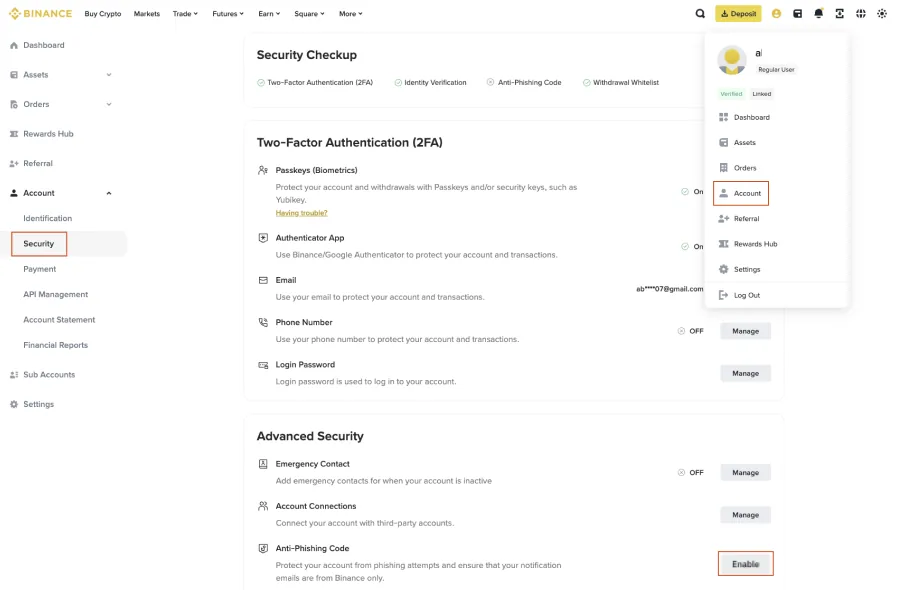
The official anti-phishing-code guide, updated 2026-08-28, covers email and SMS. On the website, look under Account and Security; in the app, follow the profile, account information and security route. Read your current account's labels and availability, then complete any required verification.
Choose recognizable text that meets the form's rules without reusing a password, password fragment or recovery material. Changing the phrase later does not revoke an existing unauthorized session.
Do not ask a stranger for a test email
Confirm the setting in your own security page, then check the expected code when a normal notification arrives. A person who has asked you for the code can copy it into a fake message. Their “test” proves little.
Changing the code does not rewrite old mail. Check when a message was generated before treating a historical notification with the old code as a reason to repeat setup through an unfamiliar link.
When sharing an explanation, hide the code and email address and leave the relevant setting or button visible. Passwords and one-time codes have no place in a public tutorial screenshot.
Check the event in the account you open yourself
An authentic code email you did not request may mean someone else is trying to sign in. Do not hand the code to a person who contacts you afterward or approve an action to “cancel” it.
If the expected phrase is missing, the event is unfamiliar or the message pressures you to pay, stop following its links. Open your known official app or site and inspect the related activity. A second verification link supplied by the same message cannot establish trust in the first.
A correct phrase is only one clue. Display names, logos and layouts can be copied, and a phrase can leak. Binance's anti-phishing guidance also notes that a sender address recognized by Binance Verify does not make the message itself immune to spoofing. Use the normal support entry if uncertain.
A brand name inside a URL is not enough
Consider this deliberately unusable teaching address: binance.com.login.example.invalid. It begins with familiar text but does not belong to binance.com.
Putting a brand in a subdomain or path does not make a site official. HTTPS alone does not establish who operates the site.
Long addresses are particularly easy to truncate on a phone. Rather than testing an unfamiliar short link, leave the message and use an app or bookmark you have already verified. A search title, logo or advertisement position cannot replace checking the destination.
“Your account is frozen” is a claim to investigate in your account. If there is no matching event, send the original message through official support. A countdown in the message does not turn its payment request into an account-protection procedure.
Requests that justify stopping immediately
- Moving funds to a supposed safe address or paying to unlock an account.
- Installing remote-control software or sharing a screen with recovery information.
- Being told that the matter can only be handled privately, outside official support.
- A familiar contact suddenly asking for your one-time code.
For an unexpected withdrawal notice, inspect withdrawal history yourself. A real unauthorized request needs the official account-protection response; a notice with no matching record needs investigation. Neither requires a payment to a “safe wallet.”
Respond to the action you actually took
Only opened the page
Close it and stop following instructions. Check whether anything downloaded, permissions were granted or another app opened. Merely viewing a page is not proof all accounts were compromised. Record the domain and time without logging in again for evidence.
Entered a password or one-time code
Use another trusted device to open the official service.
If you entered a password or one-time code, review affected sessions, recovery methods and sensitive actions, then follow the service’s protection process. Address reused passwords elsewhere, especially email. Do not use the suspicious page’s “cancel verification” button.
Installed software or allowed remote access
End the connection and stop entering secrets on that device. Protect affected accounts from a different trusted device, then follow the device maker or trusted security support to inspect software and permissions. A password change alone does not clean the device.
Signed a wallet approval or sent assets
Check the actual network, contract and permissions through trusted wallet guidance. An exchange-password reset does not resolve on-chain approvals. If a seed or private key leaked, revoking one token approval does not restore exclusive control.
For an actual transfer, preserve its record and seek help through the relevant platform or applicable reporting channel. Do not accept guaranteed recovery in private messages. See authenticator recovery if account access must be reset.
Protect the access you still control
If you entered your email password, changing an exchange password does not address the email account. From a trusted device, inspect that service's activity, recovery options and unexpected forwarding rules, following its official recovery process. Do not receive new passwords on a device someone is still controlling remotely.
Exposing only an anti-phishing code is not proof that every asset is compromised. Change it through account settings and check what else was shared. Exposing a wallet recovery phrase is a different problem: follow the wallet's emergency guidance and stop assuming only you can control it. An exchange password change cannot resolve that exposure.
| What happened | Where to investigate first |
|---|---|
| Viewed a page only | Downloads, browser permissions and opened apps |
| Entered credentials or a one-time code | The relevant account's activity, sessions and recovery options |
| Allowed remote access | Account protection from another trusted device and permissions on the affected device |
| Signed a wallet request | Actual network, requested permissions and transaction records |
These are investigation starting points, not proof of loss or a substitute for checking the affected device and account.
For Gmail, use Google’s compromised-account guidance to check devices, recovery information and forwarding rules you did not create.
What helps an official report?
Record message time, source, domain and whether you clicked, entered information, installed software, signed or transferred. Distinguish actions from guesses. Preserve original email privately if requested; it can contain personal information. Submit through verified support, keep the case receipt and avoid forwarding live dangerous links or account details to friends.
A useful report says when the message arrived, where you entered which type of information and what changed afterwards. Describe the type without including the secret itself. Add the actual network and hash if a transfer occurred; state clearly if none did.
Confirm requests for further material through the original case. When warning friends, remove personal data and avoid forwarding a live dangerous link.