A deposit pause on Binance is one of three kinds: temporary wallet maintenance, a suspension around a network upgrade or fork, or the end of support for a network. The three are treated differently for USDT that had already left your wallet when you saw “suspended” on the receiving deposit page, or a maintenance notice. The maintenance help page does not say deposits sent during maintenance are lost. The upgrade and end-of-support announcements, on the other hand, state plainly that deposits after a given time will not be credited.
While the type is still unclear, hold off on resending the same amount over a different network, and keep the transaction hash (TxID) to hand: every case below starts from it.
Deposit suspended: maintenance, upgrade or end of support?
Each kind leaves a different trail. Maintenance usually appears only as a notice on the deposit or withdrawal page. The upgrade and end-of-support examples cited below each came with a separate announcement giving the cut-off to the minute, in UTC.
- Maintenance
- Notice on the deposit or withdrawal page, with an estimated recovery time and a Set Reminder button
- Upgrade or fork
- Separate announcement naming the networks and the start time of the pause
- End of support
- Announcement titled “cease support”, with a cut-off after which deposits are not credited
The Help Center gives four reasons for maintenance: software or hardware upgrades, hard forks, network congestion, and low hot wallet balances. It also says you can still trade while deposits and withdrawals are offline.
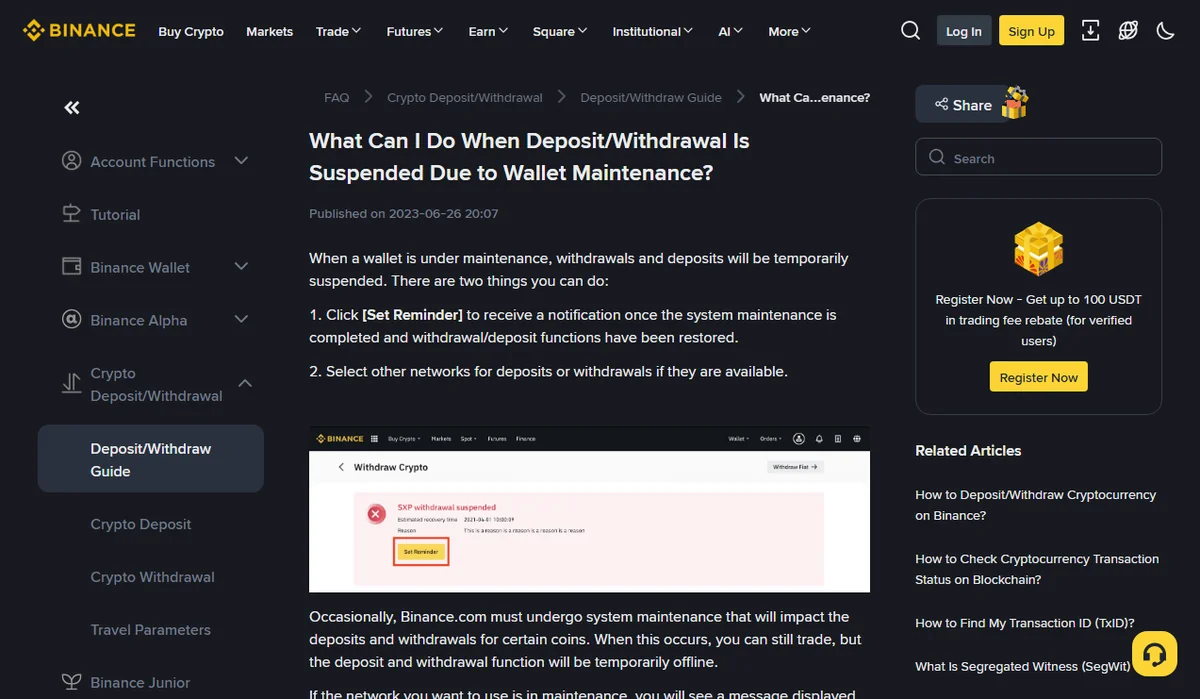
Sent during wallet maintenance: will it be credited?
The page offers two options. Click [Set Reminder] to be notified when maintenance ends and deposits and withdrawals are restored, or use another network if one is available. It says nothing about a deposit that reached the chain while maintenance was running, so this guide won’t guess either.
What you can confirm yourself is the on-chain part. Look up the transaction hash in the block explorer for that network:
- Failed, or never included in a block: the problem is on the sending side and has nothing to do with the maintenance. Contact the wallet or platform you sent from.
- Successful, to the address the deposit page gave you: wait for maintenance to end and watch your deposit history for this transaction.
If it still hasn’t appeared once deposits are back, see Binance’s guide How to Retrieve a Deposit That Hasn’t Arrived With Self-Service Recovery. In the version updated on 29 May 2026, “Deposit not credited” is listed at 5 working days, free, with the funds credited. Two conditions apply: the transaction must show as confirmed/success on the blockchain, and you apply only if an eligible deposit still hasn’t arrived after one hour. Binance reviews each application, so whether a maintenance-period deposit qualifies is decided there.
To find the hash in your withdrawal record and check the receiving address in an explorer, see USDT not received? Check the sender, blockchain and deposit record.
Deposits during a network upgrade or fork
Here the rules are spelled out. On 5 September 2022, ahead of the Ethereum Merge, Binance announced a wallet suspension for ETH and WETH on several networks starting 2022-09-06 02:00 (UTC). The notice said deposits of ETH or WETH on those networks during the suspension would not be credited, and would not count towards any forked-token credit if the chain split.
So you are comparing two timestamps: the start of the suspension in the announcement, and the block time of your transaction in the explorer. Check which time zone the explorer is showing first. If it is UTC, compare directly; if it is your local time, convert before you compare. A transaction before the cut-off is handled like the maintenance case above. One that falls inside the suspension is in the “not credited” group.
The self-service recovery page has no category that matches that second group. Contact Binance support with the hash, the announcement link and the block time rather than assuming either outcome.
Deposits after a network stops being supported
Unlike maintenance, ending support comes with no recovery time. An announcement dated 9 October 2024 listed several tokens whose deposits and withdrawals on BNB Smart Chain and another network would no longer be supported. It said that after 2024-10-23 08:00 (UTC), any deposits sent via those networks would not be credited and could lead to asset loss.
Any announcement with “cease support” in the title belongs here. The self-service page does have a case for old or delisted token deposits: 5 working days, network withdrawal fee charged, funds refunded. That case is about delisted tokens, though. Whether it covers a token that still trades but lost support on one network isn’t stated, so treat it as unconfirmed and ask support, hash in hand.
If what arrived was a token from a different network altogether, that is a wrong-network transfer. See Sent crypto on the wrong network? Check status and address control first.
Not sent yet: one more look at the deposit page
A saved screenshot of an address can’t tell you whether that network is paused right now. When you are ready to send, open the receiving deposit page again, select the exact network you will use, and copy the address from there. If it shows suspended, set a reminder, or switch to another available network as the Help Center suggests, provided your sending side supports that network too. Matching the two ends is covered in TRC20, ERC20 or BEP20: which network should you use for USDT?
If the pause is on your own withdrawal page, a separate Help Center article, What Can I Do When Withdrawal Services Are Temporarily Suspended?, names three causes. One is wallet maintenance. Another is an asset-specific network upgrade, in which case the page shows an estimated recovery time and the reason. The third is a hold on your account for security reasons. That last one has nothing to do with the network and can follow a recent password or authenticator change; see Withdrawals on hold after a password or 2FA change.
For everything else to check before you press send, go through the pre-transfer checklist.
Official pages used, opened on 8 October 2026. Binance Help Center: “What Can I Do When Deposit/Withdrawal Is Suspended Due to Wallet Maintenance?” (published 2023-06-26), “What Can I Do When Withdrawal Services Are Temporarily Suspended?”, “How to Retrieve a Deposit That Hasn’t Arrived With Self-Service Recovery” (updated 2026-05-29). Binance announcements: “Wallet Suspension for Ether (ETH) and Wrapped Ether (WETH) on Multiple Networks” (2022-09-05) and “Binance Will Cease Support for Deposits and Withdrawals of Tokens on Selected Networks” (2024-10-09). Timings, fees and conditions are what those pages showed on that date; the live page is what counts.